
Demo Query
Below you can query a small subset of the current AIRRDB. Simply put in your CDR sequences in amino acid format and the boundaries you want to search, adjust the distance (0–2 hamming per CDR) and press Search. The limit parameter will cut off any search after finding the set number of records. You may adjust it any time.
The demo comes with pre-filled credentials (user: demo, password: demo) so you can start searching right away.
Open Demo-AppQuick Start Guide
- Click "Open Demo-App" above. The login is pre-filled with demo credentials – just hit Login.
- You will see the Sequence Search interface. Enter a CDR-H3 amino acid sequence in the search field, e.g.
CARGRLSWSPDSW. - Set the hamming distance (0–2) to control how many mismatches per CDR are allowed.
- Choose the column to search on (cdrH1, cdrH2 or cdrH3) from the dropdown.
- Click Search. Results typically appear in under a second.
- Use "+ Add Filter" to combine multiple CDR filters or add length range and regex filters.
- Adjust the Limit parameter to retrieve more or fewer results (default: 50).
Screenshot
Here is what a typical search looks like in the AIRRDB demo interface:
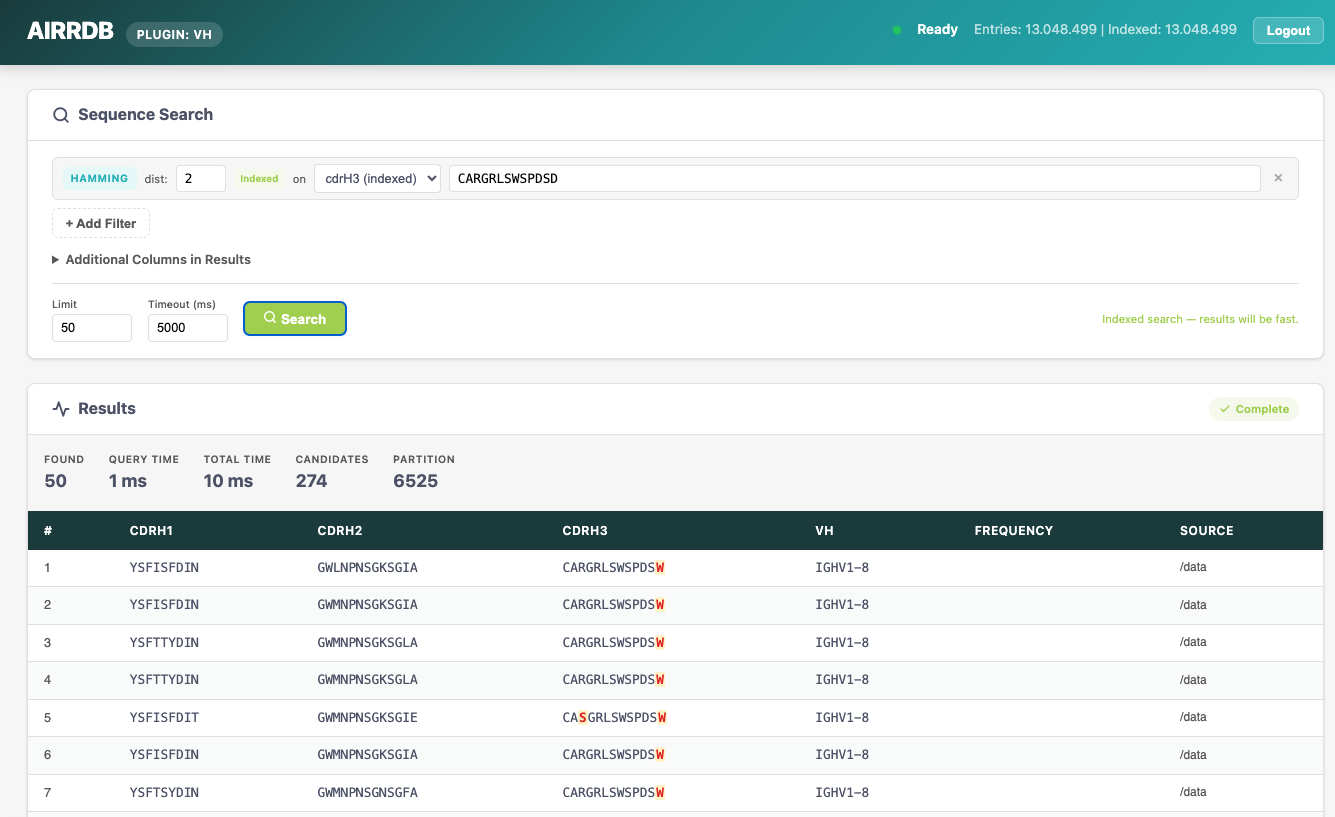
The interface lets you search CDR-H3 sequences with configurable hamming distance. Results show matching CDRH1, CDRH2, CDRH3 sequences along with VH gene usage, frequency, and source information. You can download results or view details for individual entries.
If you have any questions don't hesitate to contact us.